빌드된 바이너리를 바로 사용하거나, GPU 아키텍처에 맞게 소스에서 직접 빌드할 수 있습니다.
GPU 빌드에는 NVIDIA CUDA 12.x 런타임이 필요합니다. CUDA 12.x의 어떤 마이너 버전이든 사용 가능합니다.
Debian / Ubuntu
# Install the cuda-keyring package (sets up the NVIDIA apt repository)
# Replace <distro> with: ubuntu2404, ubuntu2204, debian12, etc.
wget https://developer.download.nvidia.com/compute/cuda/repos/<distro>/x86_64/cuda-keyring_1.1-1_all.deb
sudo dpkg -i cuda-keyring_1.1-1_all.deb
sudo apt-get update

# Install the runtime libraries (no compiler needed)
sudo apt-get install cuda-cudart-12-9 libnpp-12-9
RHEL / Fedora
sudo dnf config-manager --add-repo \
  https://developer.download.nvidia.com/compute/cuda/repos/<distro>/x86_64/cuda-<distro>.repo
sudo dnf install cuda-cudart-12-9 libnpp-12-9
CUDA Toolkit Archive에서 CUDA Toolkit 12.x 설치 프로그램을 다운로드하세요. 설치 시 사용자 지정(Custom)을 선택하고 최소한 다음 항목을 활성화하세요:
cudart)또는 설치 프로그램을 다운로드한 후 PowerShell에서 자동 설치할 수도 있습니다:
cuda_12.9.1_windows.exe -s cudart_12.9 npp_12.9 Display.Driver -n
macOS는 인터넷에서 다운로드한 파일을 격리합니다. 바이너리가 Apple 공증을 받지 않았기 때문에, 실행하려면 먼저 격리 속성을 해제해야 합니다.
mkdir -p ~/DSOStacker && curl -fL \
  https://github.com/gs18113/gpu-dso-stacker/releases/latest/download/dso-stacker-gui-macos-arm64-metal.tar.gz \
  | tar xz -C ~/DSOStacker \
  && xattr -cr ~/DSOStacker \
  && chmod +x ~/DSOStacker/DSOStacker ~/DSOStacker/_internal/bin/dso_stacker
Metal 가속이 필요 없다면 URL에서 metal을 cpu로 변경하세요.
# GPU build (CUDA 12 toolkit required)
cmake -B build -DCMAKE_BUILD_TYPE=Release \
      -DCMAKE_CUDA_COMPILER=/usr/local/cuda/bin/nvcc
cmake --build build --parallel $(nproc)

# CPU-only build (no CUDA toolkit needed)
cmake -B build -DCMAKE_BUILD_TYPE=Release -DDSO_ENABLE_CUDA=OFF
cmake --build build --parallel $(nproc)

# Enable RAW camera file support (requires libraw-dev)
cmake -B build ... -DDSO_ENABLE_LIBRAW=ON
필수 요구사항: CUDA Toolkit 12.x, CFITSIO, libtiff, libpng, CMake ≥ 3.18, LibRaw (선택)
# Install dependencies via vcpkg
vcpkg install cfitsio tiff libpng libraw --triplet x64-windows

# Configure
cmake -B build -G "Visual Studio 17 2022" -A x64 `
      -DCMAKE_TOOLCHAIN_FILE="$env:VCPKG_ROOT/scripts/buildsystems/vcpkg.cmake" `
      -DCMAKE_CUDA_COMPILER="C:/Program Files/NVIDIA GPU Computing Toolkit/CUDA/v12.6/bin/nvcc.exe"

# Build
cmake --build build --config Release --parallel
필수 요구사항: Visual Studio 2022, CUDA Toolkit 12.x, vcpkg
# Apple Silicon — Metal scaffold backend
cmake -B build -DCMAKE_BUILD_TYPE=Release \
      -DDSO_ENABLE_CUDA=OFF \
      -DDSO_ENABLE_METAL=ON
cmake --build build --parallel

# Select Metal backend at runtime
./build/dso_stacker -f frames.csv -o stacked.fits --backend metal
FITS 또는 카메라 RAW 파일에서 완성된 스택까지 — 디베이어링, 정렬, 보정, 적분을 하나의 파이프라인으로 처리합니다.
연산이 집중되는 모든 단계가 CUDA에서 실행됩니다 — VNG 디베이어, Moffat 컨볼루션, Lanczos 워프, kappa-sigma 적분 모두 더블 버퍼 스트림 오버랩으로 GPU 활용률을 극대화합니다.
적응형 시그마 임계값을 적용한 Moffat PSF 컨볼루션으로 프레임별 별을 검출합니다. 삼각형 매칭 + DLT로 호모그래피를 자동 계산하며, 수동 기준 설정이나 사전 변환이 필요 없습니다.
CR2, NEF, ARW, DNG 등 15종 이상의 RAW 포맷을 LibRaw를 통해 직접 로드합니다. 채널별 블랙 보정이 적용된 Bayer 모자이크 추출. -DDSO_ENABLE_LIBRAW=ON으로 빌드하세요.
FITS BAYERPAT 키워드 또는 RAW 메타데이터에서 Bayer 패턴을 자동 감지합니다. VNG 디모자이크로 R, G, B 평면을 분리하고, 워프와 적분을 채널별로 수행합니다.
윈저 평균, 중앙값, kappa-sigma 스태킹을 통한 Dark, Flat, Bias, Darkflat 마스터 생성. 디베이어링 전에 적용됩니다. 불량 픽셀 보호 및 Flat 정규화가 기본 내장되어 있습니다.
FITS (FP32), TIFF (FP32/FP16/INT16/INT8 + none/zip/lzw/rle), PNG (8/16비트). 파일 확장자로 포맷을 자동 결정합니다.
--cpu 플래그로 OpenMP 병렬화된 CPU 경로를 사용할 수 있습니다. Apple Silicon용 Metal 백엔드도 준비 중입니다. CPU 전용 빌드는 NVIDIA GPU나 CUDA 런타임이 필요 없습니다.
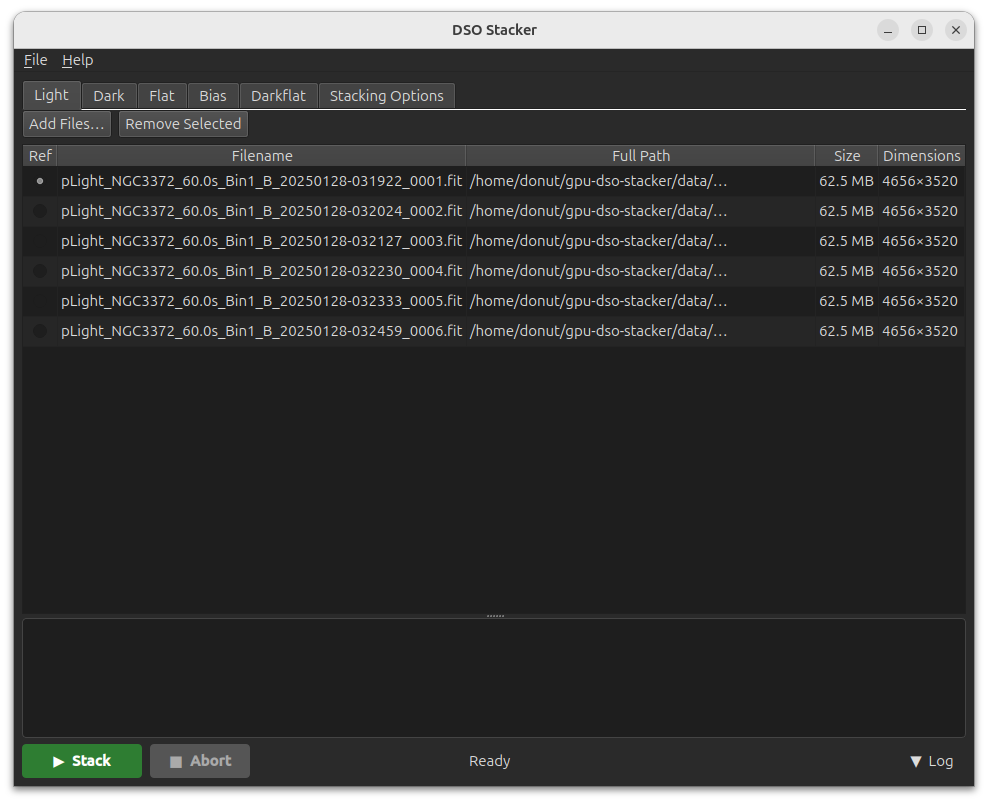
CLI를 감싼 PySide6 데스크톱 앱. 드래그 앤 드롭 프레임 관리, 모든 스태킹 옵션, YAML 프로젝트 저장/불러오기를 지원합니다.
Linux, Windows, macOS용 빌드된 GUI 번들을 Releases 페이지에서 다운로드할 수 있습니다. Python 설치 없이 — 다운로드, 압축 해제, 실행만 하면 됩니다.
CLI를 소스에서 빌드한 경우, Python으로 GUI를 직접 실행할 수 있습니다:
# Install Python deps
pip install PySide6 pyyaml

# Launch (expects ./build/dso_stacker to exist)
python src/GUI/main.py
10 × 4656×3520 프레임, 별 검출 모드. RTX 30/40 시리즈 GPU 기준.
2열 CSV 프레임 목록을 지정하고 옵션을 선택하세요.
filepath, is_reference
/data/frame1.fits, 1
/data/frame2.fits, 0
/data/frame3.fits, 0
GPU 스택 (기본값)
dso_stacker -f frames.csv -o stacked.fits
CPU 전용
dso_stacker -f frames.csv -o stacked.fits --cpu
컬러 OSC 카메라 (RGGB 센서)
dso_stacker -f frames.csv -o stacked.fits --bayer rggb --kappa 2.5 --iterations 5
보정 프레임 사용
dso_stacker -f frames.csv -o stacked.fits \
    --bias  bias_frames.txt \
    --dark  dark_frames.txt \
    --flat  flat_frames.txt \
    --save-master-frames ./masters
16비트 TIFF (ZIP 압축)
dso_stacker -f frames.csv -o stacked.tiff --bit-depth 16 --tiff-compression zip
| 확장자 | 포맷 | 비트 심도 | 압축 |
|---|---|---|---|
.fits .fit .fts | FITS | f32 (항상) | 없음 |
.tif .tiff | TIFF | f32, f16, 16, 8 | 없음 / zip / lzw / rle |
.png | PNG | 16, 8 | 무손실 DEFLATE |
6단계, 2가지 실행 경로. --cpu 플래그로 CUDA 대신 OpenMP로 전체를 실행할 수 있습니다.
| # | 단계 | GPU 경로 (기본값) | CPU 경로 (--cpu) |
|---|---|---|---|
| 1 | 디베이어링 | VNG demosaic → luminance CUDA | VNG demosaic → luminance OpenMP |
| 2 | 별 검출 | Moffat PSF conv + σ threshold CUDA | Moffat PSF conv + σ threshold OpenMP |
| 3 | 정렬 | Triangle matching + DLT CPU CUDA | Triangle matching + DLT CPU |
| 4 | 디베이어링 (워프) | VNG → lum or R/G/B CUDA | VNG → lum or R/G/B OpenMP |
| 5 | Lanczos-3 워프 | nppiRemap + coord-map kernel CUDA |
6-tap backward-map warp OpenMP |
| 6 | 적분 | Mini-batch κ-σ clipping CUDA | Full κ-σ clipping OpenMP |
12개 테스트 스위트, 180개 이상의 테스트. CUDA 디바이스가 없으면 GPU 테스트는 자동으로 건너뜁니다 (exit 77).
| 스위트 | 테스트 수 | 커버리지 |
|---|---|---|
test_cpu | 29 | CSV parser, FITS I/O, integration, Lanczos CPU |
test_gpu | 5 | GPU Lanczos |
test_star_detect | 21 | CCL + CoM, Moffat conv + threshold |
test_ransac | 13 | DLT homography, triangle matching, RANSAC |
test_debayer_cpu | 10 | VNG debayer: all 4 Bayer patterns + edge cases |
test_integration_gpu | 9 | GPU mini-batch kappa-sigma |
test_calibration | 26 | Dark/flat apply, masters, winsorized mean, median |
test_color | 33 | Color output, fits_save_rgb, Bayer detection |
test_image_io | 21 | Format detection, FITS, TIFF, PNG, auto-stretch |
test_audit | 4 | Integration stability, CCL large-frame, Lanczos baseline |
test_raw_io | 10 | Extension detection, FITS fallback, RAW dispatch |
cd build && ctest --output-on-failure -V


