GPU-Accelerated Deep Sky
Object Stacker

A high-performance image stacker for DSO astrophotography, written in C/CUDA. VNG debayering, Moffat star detection, Lanczos-3 warp, and mean / kappa-sigma / median / AAWA / entropy (HDR) integration — with CUDA, Metal, and CPU backends.

CI CUDA 12 GPLv3 C11

Getting Started

Pre-built binaries available, or build from source for your exact GPU architecture.

Download the archive for your platform from the Releases page. GPU builds require an NVIDIA GPU and CUDA 12.x runtime. CPU builds have no GPU dependency.

CUDA Runtime Setup (GPU builds only)

GPU builds require the NVIDIA CUDA 12.x runtime. Any CUDA 12.x minor version works.

Debian / Ubuntu

# Install the cuda-keyring package (sets up the NVIDIA apt repository)
# Replace <distro> with: ubuntu2404, ubuntu2204, debian12, etc.
wget https://developer.download.nvidia.com/compute/cuda/repos/<distro>/x86_64/cuda-keyring_1.1-1_all.deb
sudo dpkg -i cuda-keyring_1.1-1_all.deb
sudo apt-get update

# Install the runtime libraries (no compiler needed)
sudo apt-get install cuda-cudart-12-9 libnpp-12-9

RHEL / Fedora

sudo dnf config-manager --add-repo \
  https://developer.download.nvidia.com/compute/cuda/repos/<distro>/x86_64/cuda-<distro>.repo
sudo dnf install cuda-cudart-12-9 libnpp-12-9

CUDA Runtime Setup (GPU builds only)

Download a CUDA Toolkit 12.x installer from the CUDA Toolkit Archive. During installation, select Custom and enable at minimum:

  • CUDA Runtime (cudart)
  • NPP (NVIDIA Performance Primitives)
  • Display Driver (if not already installed)

Alternatively, install silently from PowerShell after downloading the installer:

cuda_12.9.1_windows.exe -s cudart_12.9 npp_12.9 Display.Driver -n

Gatekeeper Workaround

macOS quarantines files downloaded from the internet. Since the binaries are not Apple-notarized, you need to clear the quarantine attribute before macOS will allow them to run.

mkdir -p ~/DSOStacker && curl -fL \
  https://github.com/gs18113/gpu-dso-stacker/releases/latest/download/dso-stacker-gui-macos-arm64-metal.tar.gz \
  | tar xz -C ~/DSOStacker \
  && xattr -cr ~/DSOStacker \
  && chmod +x ~/DSOStacker/DSOStacker ~/DSOStacker/_internal/bin/dso_stacker

Replace metal with cpu in the URL if you don't need Metal acceleration.

# GPU build (CUDA 12 toolkit required)
cmake -B build -DCMAKE_BUILD_TYPE=Release \
      -DCMAKE_CUDA_COMPILER=/usr/local/cuda/bin/nvcc
cmake --build build --parallel $(nproc)

# CPU-only build (no CUDA toolkit needed)
cmake -B build -DCMAKE_BUILD_TYPE=Release -DDSO_ENABLE_CUDA=OFF
cmake --build build --parallel $(nproc)

# Enable RAW camera file support (requires libraw-dev)
cmake -B build ... -DDSO_ENABLE_LIBRAW=ON

Prerequisites: CUDA Toolkit 12.x, CFITSIO, libtiff, libpng, CMake ≥ 3.18, LibRaw (optional)

# Install dependencies via vcpkg
vcpkg install cfitsio tiff libpng libraw --triplet x64-windows

# Configure
cmake -B build -G "Visual Studio 17 2022" -A x64 `
      -DCMAKE_TOOLCHAIN_FILE="$env:VCPKG_ROOT/scripts/buildsystems/vcpkg.cmake" `
      -DCMAKE_CUDA_COMPILER="C:/Program Files/NVIDIA GPU Computing Toolkit/CUDA/v12.6/bin/nvcc.exe"

# Build
cmake --build build --config Release --parallel

Prerequisites: Visual Studio 2022, CUDA Toolkit 12.x, vcpkg

# Apple Silicon — Metal scaffold backend
cmake -B build -DCMAKE_BUILD_TYPE=Release \
      -DDSO_ENABLE_CUDA=OFF \
      -DDSO_ENABLE_METAL=ON
cmake --build build --parallel

# Select Metal backend at runtime
./build/dso_stacker -f frames.csv -o stacked.fits --backend metal
Metal backend is scaffolded. Currently falls back to the CPU pipeline while Metal kernels are ported incrementally.

Features

From raw FITS or camera RAW files to a finished stack — debayering, alignment, calibration, and integration in one pipeline.

GPU-Accelerated Pipeline

Every compute-heavy stage runs on CUDA — VNG debayer, Moffat convolution, Lanczos warp, and kappa-sigma / median / AAWA / entropy integration use double-buffered stream overlap for maximum GPU utilization.

Automatic Star Alignment

Moffat PSF convolution with adaptive sigma threshold detects stars per frame. Optional Levenberg-Marquardt Gaussian centroid fitting refines positions to ~0.01-0.05 pixel accuracy. Triangle-matching + RANSAC computes alignment transforms — auto-selecting from projective, bilinear, bisquared, or bicubic models based on star density for optimal field-curvature correction. Per-frame quality scoring (FWHM, roundness, star count) with optional automatic rejection of poor sub-frames.

RAW Camera File Support

Load CR2, NEF, ARW, DNG, and 12 other RAW formats directly via LibRaw. Raw Bayer mosaic extraction with per-channel black subtraction. Build with -DDSO_ENABLE_LIBRAW=ON.

Full Color Output

Bayer pattern auto-detection from FITS BAYERPAT keyword or RAW metadata. VNG demosaic produces separate R, G, B planes; all warp and integration stages run per-channel.

Drizzle (2× / 3×)

Sub-pixel dithering recovery via Fruchter & Hook drizzle algorithm. 2× or 3× output resolution with configurable drop fraction. Bayer Drizzle operates on raw CFA data for artifact-free full-color super-resolution.

Calibration Frames

Dark, flat, bias, and darkflat master generation via winsorized mean, median, or kappa-sigma stacking. Applied before debayering. Dead-pixel guard and flat normalization built-in.

Flexible Output Formats

FITS (FP32), TIFF (FP32/FP16/INT16/INT8 + none/zip/lzw/rle), PNG (8/16-bit). Format detected from file extension.

CPU & Apple Silicon

Full OpenMP-parallelized CPU path via --cpu. Metal backend scaffolded for Apple Silicon. CPU-only builds require no NVIDIA GPU or CUDA runtime.

White Balance

Camera, auto (gray-world), or manual per-channel white balance applied to raw Bayer mosaic before demosaicing for accurate color rendering.

Background Normalization

Per-channel or RGB background calibration normalizes sky brightness across frames before stacking. Essential for sessions with varying sky conditions.

Desktop GUI

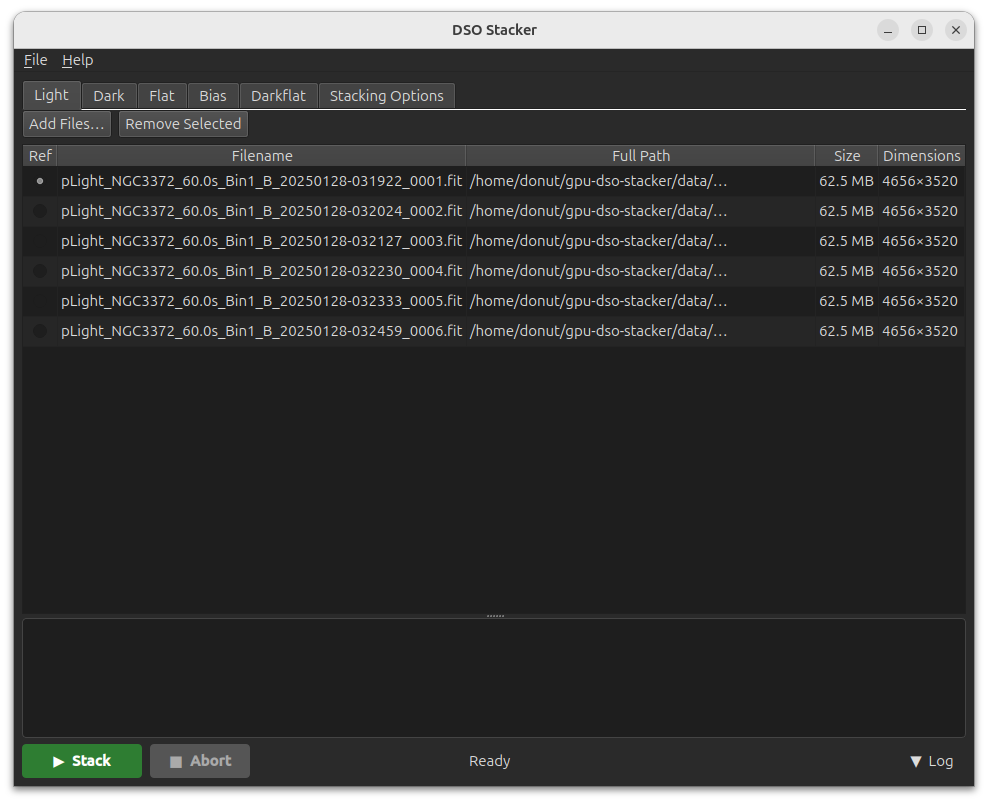
A PySide6 desktop app wrapping the CLI. Drag-and-drop frame management, all stacking options, and YAML project save/load.

Pre-built GUI bundles are available on the Releases page for Linux, Windows, and macOS. No Python installation required — just download, extract, and run.

  • Drag-and-drop FITS or RAW files onto Light, Dark, Flat, Bias, or Darkflat tabs
  • Async FITS metadata loading — UI never blocks
  • Conditional option visibility based on integration method and output format
  • YAML project files — save and reload complete state
  • Live log output + abort support

Running from source

If you built the CLI from source, you can run the GUI directly with Python:

# Install Python deps
pip install PySide6 pyyaml

# Launch (expects ./build/dso_stacker to exist)
python src/GUI/main.py
DSO Stacker GUI

Benchmark

10 × 4656×3520 frames, star-detection mode. RTX 30/40-series GPU.

GPU (CUDA)
~2.6s
Double-buffered stream overlap
CPU (OpenMP)
~11.5s
All stages parallelized
GPU
2.6 s
CPU
11.5 s
Output agreement: PSNR ≈ 82.4 dB, mean relative error ≈ 0.02% in image interior. Differences arise from distinct floating-point paths.

CLI Usage

Point it at a 2-column CSV frame list and choose your options.

Input CSV format

filepath, is_reference
/data/frame1.fits, 1
/data/frame2.fits, 0
/data/frame3.fits, 0

Examples

GPU stack (default)

dso_stacker -f frames.csv -o stacked.fits

CPU-only

dso_stacker -f frames.csv -o stacked.fits --cpu

Color OSC camera (RGGB sensor)

dso_stacker -f frames.csv -o stacked.fits --bayer rggb --kappa 2.5 --iterations 5

With calibration frames

dso_stacker -f frames.csv -o stacked.fits \
    --bias  bias_frames.txt \
    --dark  dark_frames.txt \
    --flat  flat_frames.txt \
    --save-master-frames ./masters

16-bit TIFF with ZIP compression

dso_stacker -f frames.csv -o stacked.tiff --bit-depth 16 --tiff-compression zip

Output Formats

ExtensionFormatBit depthsCompression
.fits .fit .ftsFITSf32 (always)none
.tif .tiffTIFFf32, f16, 16, 8none / zip / lzw / rle
.pngPNG16, 8lossless DEFLATE

Processing Pipeline

Six stages, two execution paths. Pass --cpu to run everything with OpenMP instead of CUDA.

#StageGPU path (default)CPU path (--cpu)
1Debayering VNG demosaic → luminance CUDA VNG demosaic → luminance OpenMP
2Star Detection Moffat PSF conv + σ threshold CUDA Moffat PSF conv + σ threshold OpenMP
2bCentroid Refinement (optional) LM Gaussian fitting CUDA LM Gaussian fitting OpenMP
3Alignment Triangle matching + DLT CPU CUDA Triangle matching + DLT CPU
4Debayering (warp) VNG → lum or R/G/B CUDA VNG → lum or R/G/B OpenMP
5Lanczos-3 Warp nppiRemap + coord-map kernel CUDA 6-tap backward-map warp OpenMP
6Integration Mini-batch mean / κ-σ / median / AAWA / entropy CUDA Mean / κ-σ / median / AAWA / entropy OpenMP
Single-pass loading — each frame file is opened exactly once. Star detection, alignment, and warping all complete before the next frame is loaded.
Mismatch handling — frames that fail alignment (too few stars or triangle-matching mismatch) are skipped gracefully.

Test Coverage

370+ tests across 21 suites. GPU tests auto-skip (exit 77) when no CUDA device is found.

SuiteTestsCoverage
test_cpu51CSV parser, FITS I/O, integration (mean, kappa-sigma, median, AAWA, entropy), Lanczos CPU
test_gpu5GPU Lanczos
test_star_detect31CCL + CoM, Moffat conv + threshold
test_centroid_lm9LM Gaussian centroid fitting (CPU)
test_frame_quality9FWHM, roundness, background, composite scoring
test_ransac23DLT homography, triangle matching, RANSAC
test_transform16Polynomial transform eval, fit, auto-select
test_debayer_cpu16VNG debayer: all 4 Bayer patterns + edge cases
test_integration_gpu11GPU mini-batch kappa-sigma, median, AAWA, entropy
test_calibration34Dark/flat apply, masters, winsorized mean, median, kappa-sigma
test_color33Color output, fits_save_rgb, Bayer detection
test_white_balance16Bayer color LUT, wb_apply_bayer, wb_auto_compute
test_image_io26Format detection, FITS, TIFF, PNG, auto-stretch
test_raw_io11Extension detection, FITS fallback, RAW dispatch
test_background11bg_compute_stats, bg_normalize_cpu
test_drizzle10Drizzle init, identity 2x, subpixel shift, Bayer channels
test_audit3Integration stability, CCL large-frame, Lanczos baseline
test_pipeline_cpu21CPU pipeline end-to-end, calibration, color, drizzle
test_pipeline_backend8Backend dispatch, selection logic
test_numerical16Numerical precision, edge cases
test_cross_stage11Cross-stage integration tests
cd build && ctest --output-on-failure -V